Broadcast-grade lighting correction, in your live chain.
A real-time AI processing layer for live outdoor sports, on the camera feeds before your vision mixer or on the program output, designed for professional broadcast workflows. Keep your existing cameras. Processing runs on GPU infrastructure. Non-generative AI: nothing is added or invented, and no artifacts.
SDINDISMPTE ST 2110RTSPUp to 4K60Full specificationsOne layer, two setups
Large productions
Smaller productions
Designed for your signal chain
Standards-native
SMPTE 2110, NDI, SDI, RTSP and file-based streams, up to 4K60.
Flexible deployment
GPU-based edge or production-hub deployment.
Pipeline integration
On each camera feed before the vision mixer, or on the program output.
Real-time inference
Runs on live feeds, engineered for broadcast timing.
Keep your existing cameras
Processing runs on GPU infrastructure and adds a lighting-correction layer to your production chain.
Broadcast-grade out
Hands the next stage in the chain an already-corrected signal.
Potential benefits for your production
Potential bandwidth savings
Can reduce the bitrate required for comparable visual quality, depending on the footage and encoding configuration.
Potential reduction in supplementary lighting
Potential to reduce reliance on supplementary daytime lighting, subject to venue and production requirements.
Less manual sun-and-shadow balancing
Can reduce manual intervention for sun-and-shadow balancing.
Operational and financial benefits depend on your footage, encoding configuration and production requirements. Explore an illustrative scenario in the savings calculator, or discuss your setup with us.
See the difference
Drag to compare the original frame with the LivePictureAI-processed version.
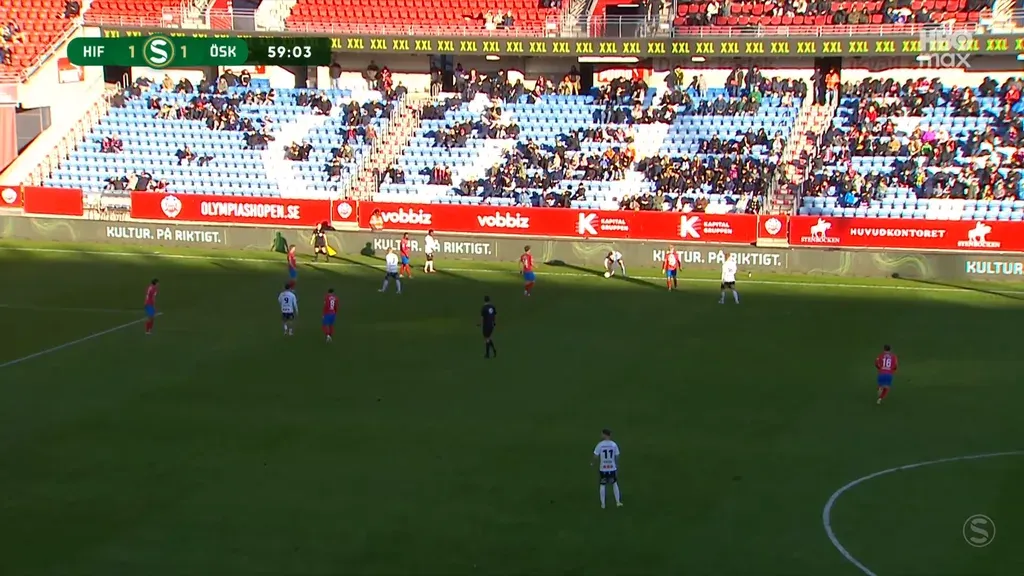
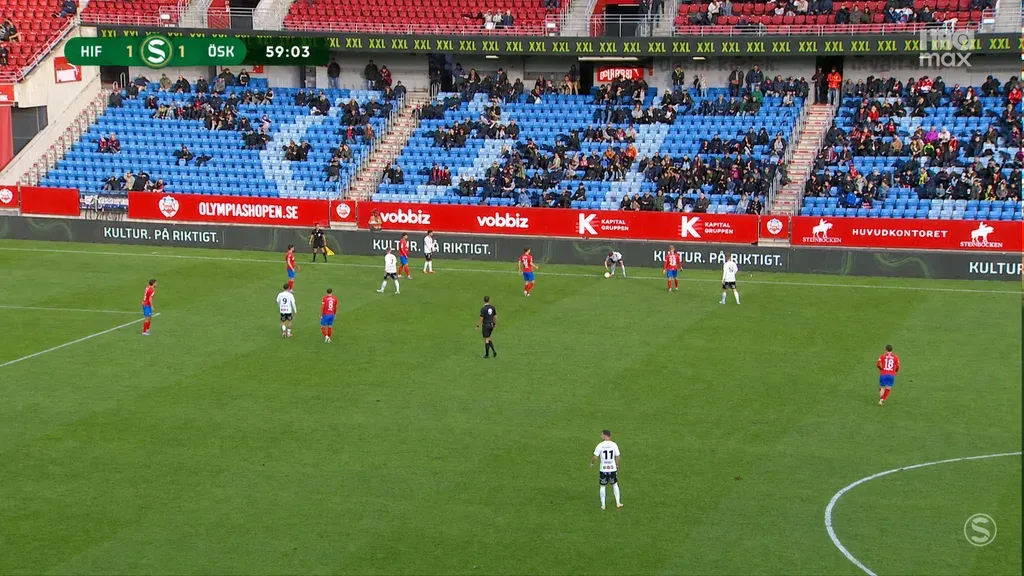
LivePictureAI automatically reduces harsh sunlight and deep shadows to balance lighting, in real time.
Integration, answered
Where does LivePictureAI sit in the chain?
Which signal formats are supported?
Can AI replace manual camera shading, or our vision engineers and graders?
Do we have to change our cameras or workflow?
What hardware does it need?
Does the AI generate or invent anything in the picture?
What about latency?
Working in football specifically? See the live football page, or outdoor sports for rugby, cricket, tennis and more. All specs are on broadcast integration. For the integration detail, read NDI and SDI integration and low-latency AI in the OB truck. Balancing the picture ahead of encoding? See pre-processing before distribution.
Interested in LivePictureAI?
Book a call or send us a message, whichever suits you.
Grab 30 minutes with the team and pick a time that suits you. You'll get instant confirmation and a Microsoft Teams link.
See available timesPick a day
Pick a time (Europe/Stockholm)
No open times in the next two weeks. Just and we'll find one.
You're booked in
We've emailed you a confirmation with the Microsoft Teams link. See you .
Prefer to write? instead.