See what's actually on the wire, and what's wrong with it.
A Windows app that analyzes, generates and troubleshoots SMPTE ST 2110 streams. Scopes, PTP timing, NMOS control and a signal generator in one place, plus a diagnosis that tells you the root cause when something breaks.
No card needed. The license key arrives by email within a minute.
- ST 2110-20, -30, -31 and -40
- ST 2022-7 redundancy
- Blackmagic IP10
- PTP: ST 2059-2 and AES67
- NMOS IS-04 and IS-05
- Up to 4K on one 10 GbE card
- Windows 10 and 11
One PC and a 10 GbE card, instead of a rack
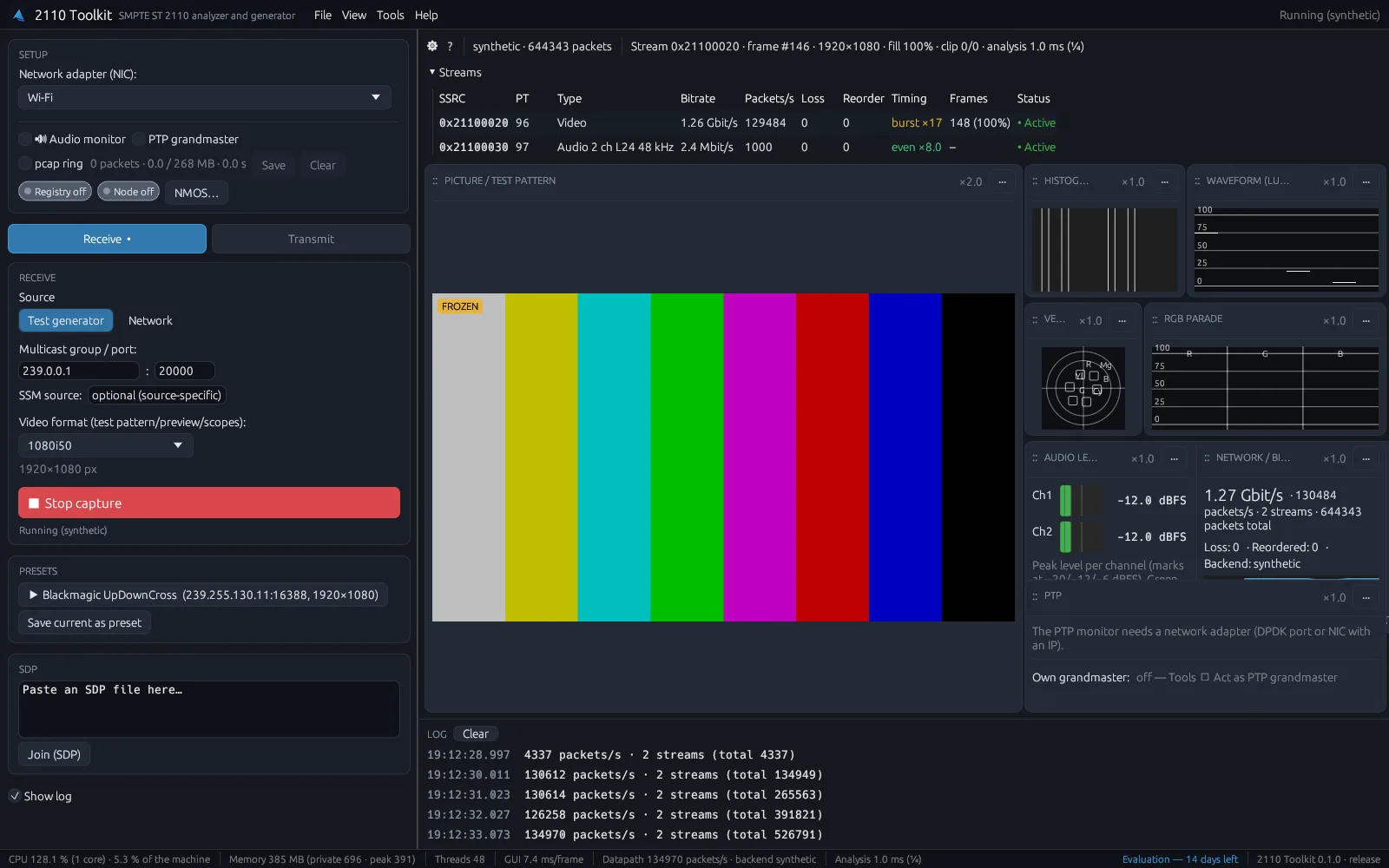
Checking an ST 2110 and NMOS install usually takes a waveform monitor, a protocol analyzer, a PTP grandmaster and an NMOS controller, each in its own box. And when something breaks, you still have to work out which of their numbers matters. 2110 Toolkit puts all of it, plus a signal generator, into one Windows app. Install it on a laptop, plug in a NIC, and see the picture, audio, network and timing. When something is off, the diagnosis tells you where to look first.
Analyze and generate, in the same app
Analyze: receive and inspect
- Video, audio and ANC for ST 2110-20, -30 and -40. Up to 4K via DPDK on an Intel X550, or 1080p on a standard Windows NIC
- Blackmagic IP10 for 4K over 10 GbE
- Full-resolution picture on the GPU, with waveform, vectorscope, RGB parade, histogram and a 10-bit pixel inspector
- Freeze, black and gamut alerts, so a stuck or clipped source doesn't slip through unnoticed
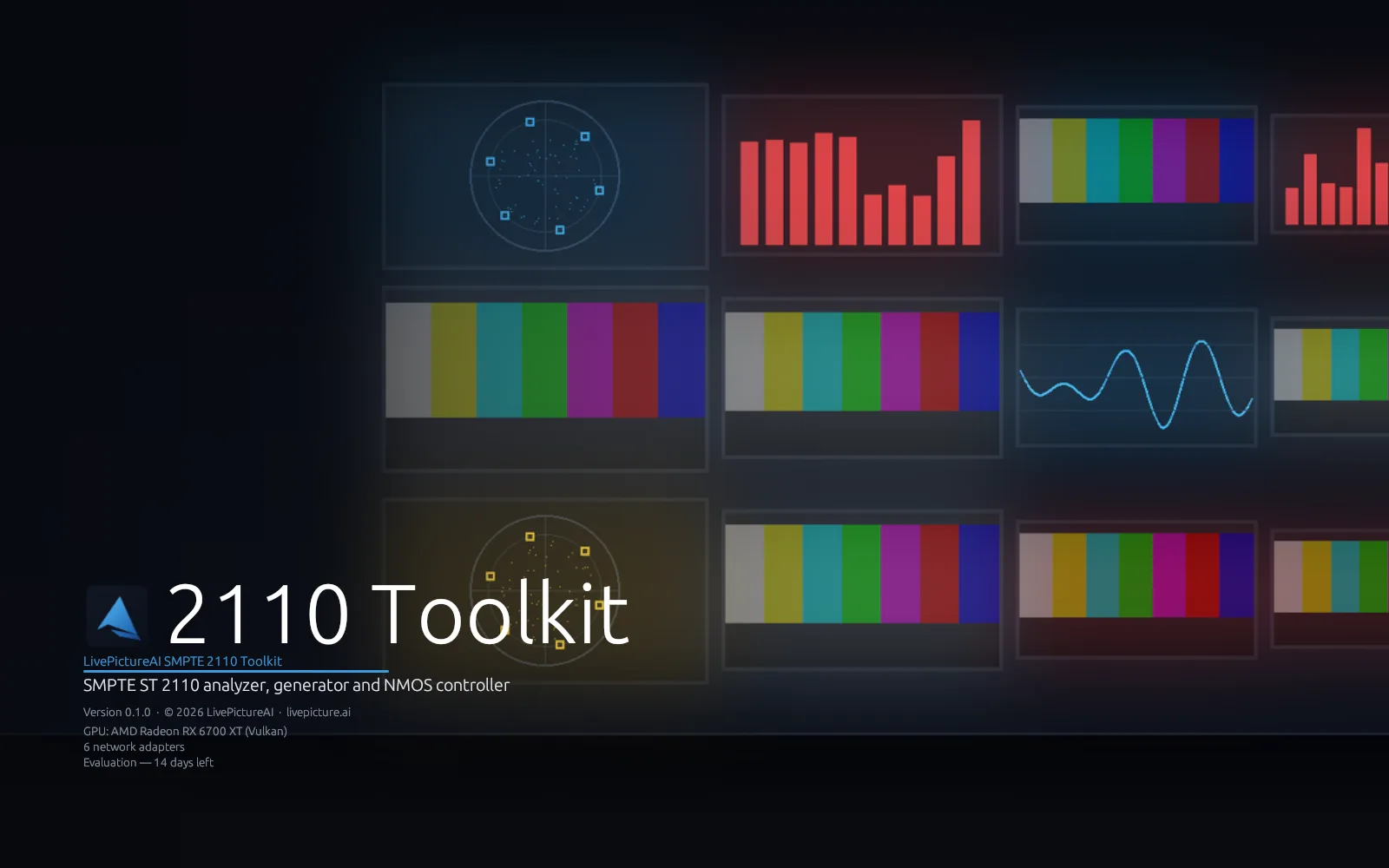
- A multiviewer with up to 36 streams at once, named from NMOS, with alarm borders and audio meters
- Audio levels for every stream, EBU R128 loudness and true peak, correlation and Lissajous
- Timecode, captions (CEA-608/708 and OP-47), AFD, SCTE-104 and VPID, read live from the ANC streams
- Per-stream bitrate, loss, reordering, packet-interval histograms, ST 2110-21 timing and NIC drop counters
- An in-memory pcap ring you can save and open straight in Wireshark, plus recording on alarm
Generate: send a reference
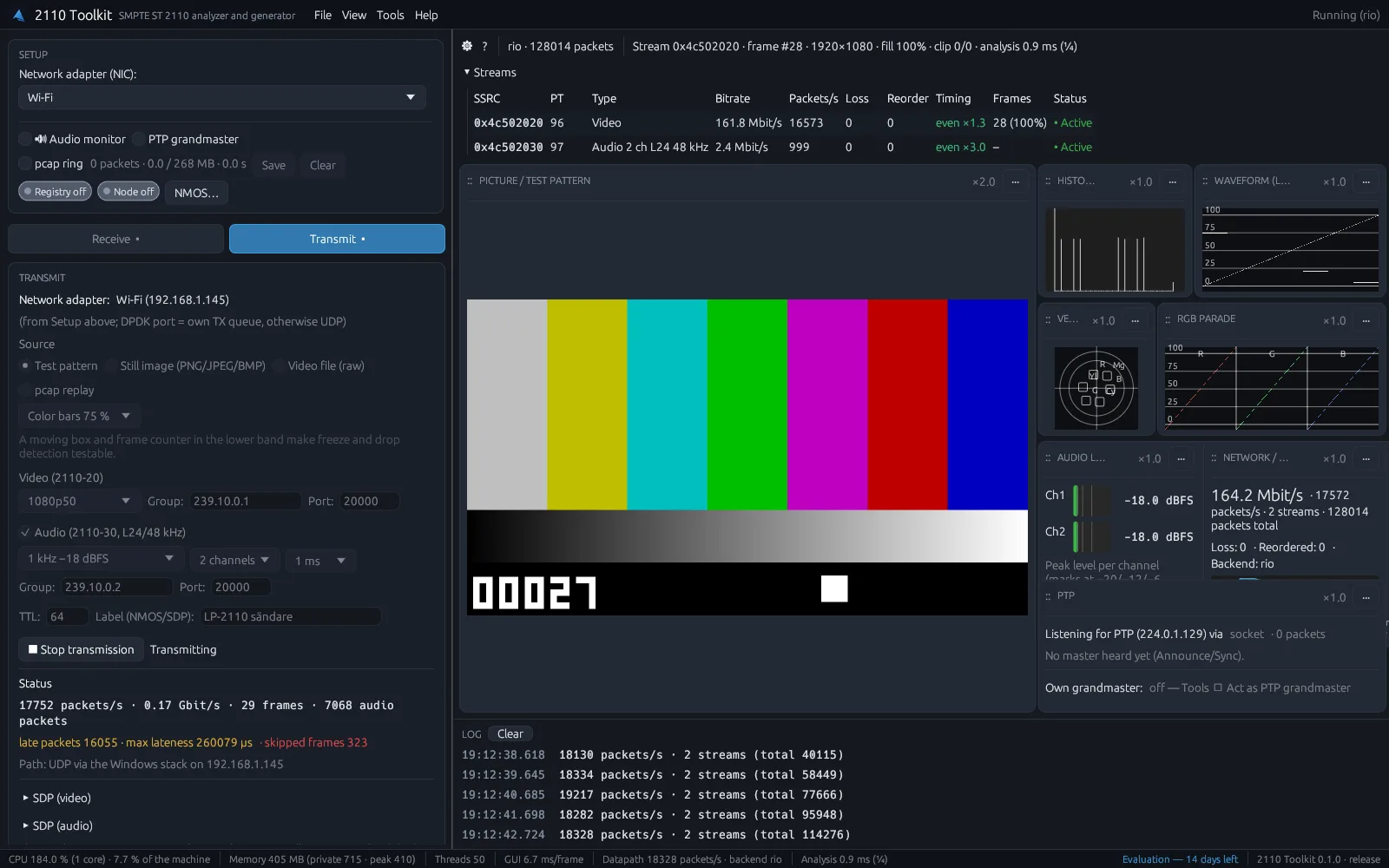
- Test pattern, still image (PNG, JPEG or BMP), mp4 file (H.264 or H.265), raw video file or pcap replay
- ST 2110-20 video in 720p, 1080p or 2160p at 25 to 60 Hz, with gapped pacing
- ST 2110-30 test tone with 1 to 16 channels, PTP-aligned to your reference
- Blackmagic IP10 as a test source
- A moving box and frame counter, so you can check a receiver's freeze and drop detection
- A flash and beep pattern to measure lip sync through a mixer, encoder or multiviewer
- SDP generated for you, and the sender exposed over NMOS for any controller to connect
The app tells you what's wrong
Most analyzers show hundreds of measurements and leave the conclusion to you. 2110 Toolkit checks the whole chain and tells you what is most likely wrong, why, and what you can do about it.
The diagnosis checks the network card, multicast, PTP, NMOS, the stream description (SDP), loss and timing, and the picture itself. It shows the root cause first. If the network card is dropping packets, that goes at the top, and the loss and broken frames that follow from it sit underneath. Every finding comes with a plain-English explanation, the measurements behind it and suggested fixes.
Start the diagnosis from an alarm, from a stream or from an NMOS receiver. You can save the result as a report and attach it to a support ticket.
See what's sent, not just what's claimed
2110 Toolkit compares what the sender promises in its SDP with what actually arrives on the network: resolution, frame rate, interlaced or progressive, audio channel count, channel order and packet time. If the SDP says 1080p50 but the sender is sending 1080i50, you see it right away.
Frame rate, resolution and black or frozen picture are measured for every video stream at once, not just the one you're watching.
NMOS that matches reality
The app reads what the NMOS registry says about senders and receivers, and checks it against the network. It spots a sender that is switched off, a receiver connected to a sender that no longer exists, and a receiver listening to a different group than the one its sender is sending to.
Active tests
When the measurements are not enough, the app tests for itself, always after a click: it sends its own test stream through the network and checks that it comes back, rejoins a group and times the first packet, compares the loss with other streams from the same switch, and listens for PTP to list every master it hears.
That tells you whether the fault is in the network, the source or the receiver.
AI that works from real measurements
Ask about your network in your own words. The answers build on the diagnosis, not on guesswork.
AI analysis in the app
Ask in plain words, such as "Why is the audio crackling on channel 3?", and get an answer built on the diagnosis measurements from your own network. The AI points out the likely cause, suggests the next step and says what the app cannot see.
The AI never changes anything. It can suggest a test, ask to look at a frame or propose rerouting a receiver in NMOS, but you decide and do it yourself. You see exactly what is sent, and can hide addresses and names.
Connect your own AI assistant
2110 Toolkit has a built-in MCP server. It lets AI assistants such as Claude Desktop and Claude Code read what the app sees and run the diagnosis. Ask "Why is the picture on CAM-3 black?" and get an answer based on real measurements from your network.
The assistant can explain and suggest, but it can never change devices, streams or settings. The connection is off by default, only works on your own computer and needs a key. Turn it on with a checkbox and the app gives you a ready-made config to paste in.
Timing, lip sync and both paths of ST 2022-7
ST 2110-21 sender timing
Each sender measured against Narrow, Narrow Linear and Wide, with Cinst, VRX and TRoffset, so you know which receivers it will work with before it reaches them.
RTP time against PTP
How far behind PTP time each stream sits, in microseconds and lines. It exposes senders that are not PTP-locked, the wrong clock and timestamps in the future.
Audio and video sync
The offset between sound and picture in milliseconds, judged against the EBU limits.
Flash and beep
Send the app's flash and beep pattern through a mixer, encoder or multiviewer and measure the lip sync through the equipment itself.
ST 2022-7: both paths
The app finds the red and blue paths on its own and shows loss per path, how many packets the other path rescued, loss after merging and the path skew against receiver classes A, B and C. You see when protection covers a fault, and when a path has gone and the protection with it.
PTP and NMOS, not bolted on
PTP monitor
Hardware timestamps show offset, path delay, Allan deviation and SMPTE ST 2059-2 TLVs, so you can see whether your grandmaster is really holding lock.
Built-in grandmaster
No PTP source on the bench? The toolkit can be its own grandmaster on the X550, with ST 2059-2 or AES67 profiles and BMCA, so you always have a reference to test against.
NMOS controller
IS-04 discovery through a registry or peer-to-peer mDNS, IS-05 connect and disconnect, and sender on/off, from the same app that does the analysis.
NMOS node and registry
The toolkit registers itself as an NMOS node, and ships a local IS-04 registry (nmos-cpp) with a web UI for networks that don't have one.
Every channel, every caption, every timecode
Every audio stream at once
Level meters for all audio streams, not just the one you are listening to, with EBU R128 loudness and true peak for the pair you monitor. Channel names come from the SDP's channel order, such as L, R, C and LFE.
ST 2110-31 (AES3)
Dolby E and other SMPTE 337 data are recognized, and channel status, CRC and the V bit are checked.
Timecode
Live timecode from the ANC stream, checked to advance one frame per picture and compared with PTP time. An alarm goes off when it jumps or stands still.
Captions
CEA-608, CEA-708 and teletext subtitles (OP-47) that you can read right in the app, with full national character sets, or show on top of the picture. An alarm goes off when captions stop arriving.
AFD, SCTE-104, VPID and metadata
The ANC data window shows AFD in plain words, such as "pillarbox 4:3 in 16:9", checked against the picture. SCTE-104 ad signals are decoded into the event log, VPID is shown in plain words and compared with the SDP, and audio and HDR metadata are shown when present.
See more at once, and keep the evidence
Multiviewer
Many streams at once in a grid, named from NMOS, with a border in the alarm color, audio meters and black and freeze markers. Click a tile to see the stream in full resolution with scopes. Personal has 4 tiles, Team up to 36.
Recording on alarm and reports
When an alarm goes off, a pcap file with a few seconds before and after is saved and named in the event log. Search the log and export it as CSV or JSON, or as an HTML report with diagnosis, streams, events and links to the pcap files, ready to attach to a support ticket.
Long-term recording
Record straight to disk for as long as you need, with file rotation and a disk limit, and headers only if you want to save space.
Send an mp4 file
Play an mp4 file (H.264 or H.265) as ST 2110 video and audio, fitted to the format you choose and looped. The app uses Windows' own decoders; H.265 needs Microsoft's HEVC Video Extensions.
Blackmagic IP10
Receive and send Blackmagic's IP10 codec for 4K over a single 10 GbE link.
Remote probes
2110 Toolkit as a permanent measurement point in a rack or an OB van, with a REST API and alarms to syslog, webhooks (Slack, Teams) and SNMP.
Error logging, if you want it
Send error logs to LivePictureAI so we can help faster and see which faults are most common. It is off by default, you see what is sent and can delete your data whenever you like. Picture, sound and AI conversations are never sent.
Verified against commercial 2110 hardware
2110 Toolkit has been verified interoperable with a commercial ST 2110 converter, with NMOS registration, IS-05 connection management, reception and PTP lock all confirmed against real hardware.
Long-run PTP lock holds, and a third-party ST 2110 receiver joins and decodes the stream the toolkit sends. It is a diagnostic and generation tool, not a certified conformance suite. Subscribe or start a 14-day trial below, and the license key and download link are emailed to you automatically.
But what does LivePictureAI actually do?
Real-time tone mapping for harsh sunlight in sports broadcasts
LivePictureAI develops real-time AI lighting correction for outdoor sports broadcasts. It balances harsh sunlight and deep shadow to improve visibility within professional production workflows. Keep your existing cameras. Processing runs on GPU infrastructure.
AI image tools for the broadcaster's live production chain
If you're already thinking about your ST 2110 signal chain, this is the other half of it: the same broadcast-engineering rigor, pointed at making the pictures your viewers actually see look better.
See how LivePictureAI enhances the picture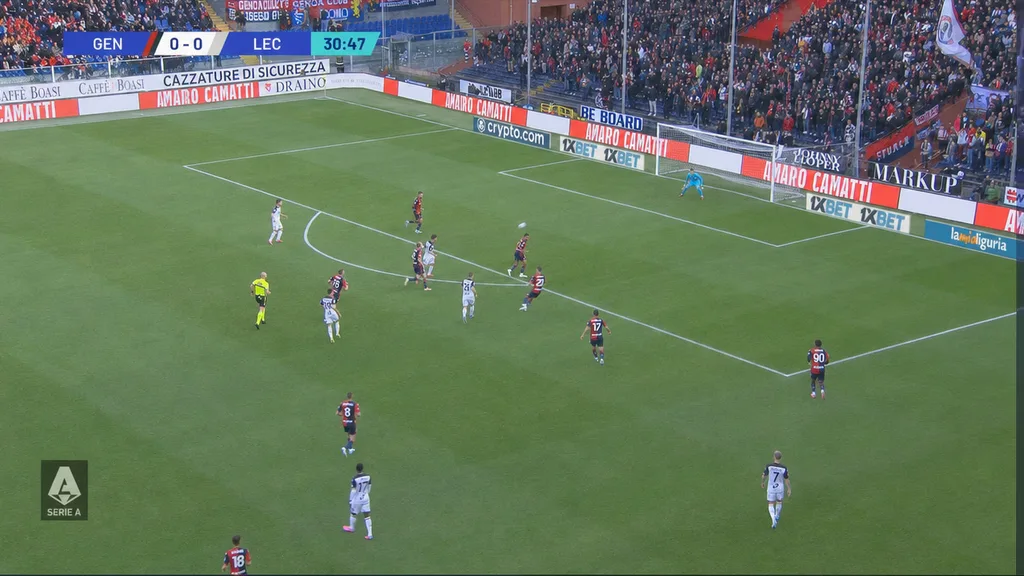
2110 Toolkit, answered
What does the 2110 Toolkit actually check?
What does the diagnosis do?
Can I export what happened for a support ticket?
What hardware do I need?
Does it handle ST 2022-7?
Can it read timecode and captions?
Can I use it with Claude or another AI assistant?
Our PTP won't lock. Where do we start?
The stream decodes fine but a receiver drops frames. Why?
Why is there no audio when the video works?
Does it support NMOS?
Can it generate test signals, not just analyze?
What's the difference between Personal and Team?
Is it ready for production use?
How do I get it, and what does it cost?
Does the app send any data to LivePictureAI?
What platforms and languages are supported?
Field guides
Longer write-ups on the problems this tool was built to answer, written for engineers, not for search engines.
Enhancing outdoor sports feeds instead? See how LivePictureAI fits a live production pipeline on the broadcaster & OB page.
Personal or Team
Both plans include the full analyzer, the diagnosis, AI analysis, ST 2022-7, the signal generator, PTP and NMOS. Team adds a 36-tile multiviewer, long-term recording, remote probes, more seats and priority support.
| Feature | Personal$49€45495 kr a month | Team$199€1791 995 kr a month |
|---|---|---|
| Formats | ||
| Uncompressed ST 2110-20 video, -30 audio and -40 ANC | Included | Included |
| ST 2110-31 (AES3) audio, including Dolby E and other SMPTE 337 data | Included | Included |
| ST 2022-7 seamless protection: red and blue paths | Included | Included |
| Blackmagic IP10: 4K over 10 GbE | Included | Included |
| Up to 4K via DPDK on an Intel X550, 1080p on a standard NIC | Included | Included |
| Receive | ||
| Join a stream by multicast address, SDP or NMOS, with IGMP handled for you | Included | Included |
| Saved stream presets: group, port and video format | Included | Included |
| NIC setup in the app: buffer tuning, DPDK port roles and firewall rules | Included | Included |
| Built-in test generator, so you can try the app without a network | Included | Included |
| Analyze | ||
| Full-resolution picture on the GPU, also in 4K | Included | Included |
| Waveform, vectorscope, RGB parade and histogram | Included | Included |
| Pixel inspector with Y/Cb/Cr and RGB in 10 bits | Included | Included |
| Freeze, black and gamut alerts | Included | Included |
| Bitrate, loss, reordering and packet-interval histograms per stream | Included | Included |
| Drop counters for the processing ring, NIC and driver | Included | Included |
| pcap ring with export to Wireshark | Included | Included |
| Layout templates and full-screen picture | Included | Included |
| Multiviewer | ||
| Streams in a grid with NMOS names, alarm borders, audio meters and black and freeze markers (tiles) | 4 | 36 |
| Click a tile for full resolution with scopes | Included | Included |
| Timing & sync | ||
| ST 2110-21 against Narrow, Narrow Linear and Wide, with Cinst, VRX and TRoffset | Included | Included |
| RTP time against PTP per stream, in microseconds and lines | Included | Included |
| Audio and video sync against the EBU limits | Included | Included |
| Flash and beep: lip sync measured through a mixer, encoder or multiviewer | Included | Included |
| ST 2022-7: loss per path, rescued packets, loss after merging and path skew against classes A, B and C | Included | Included |
| Audio | ||
| Level meters for every audio stream at once | Included | Included |
| EBU R128 loudness and true peak | Included | Included |
| Correlation and Lissajous | Included | Included |
| ST 2110-31: Dolby E and SMPTE 337 detection, channel status, CRC and V bit | Included | Included |
| Channel names from the SDP's channel order (L, R, C, LFE) | Included | Included |
| ANC & captions | ||
| ANC data types per stream (DID/SDID) | Included | Included |
| Live timecode, checked frame by frame and compared with PTP time | Included | Included |
| Captions in CEA-608, CEA-708 and teletext OP-47, readable in the app or over the picture | Included | Included |
| AFD in plain words, checked against the picture | Included | Included |
| SCTE-104 ad signals decoded into the event log | Included | Included |
| VPID in plain words, compared with the SDP | Included | Included |
| Audio and HDR metadata | Included | Included |
| Alarms when timecode jumps or stands still, or captions stop | Included | Included |
| Diagnose | ||
| Diagnosis that puts the root cause first, with explanation, evidence and fixes | Included | Included |
| Start from an alarm, a stream or an NMOS receiver | Included | Included |
| Save the result as a report for a support ticket | Included | Included |
| SDP compared with what's actually on the wire, including channel order | Included | Included |
| Frame rate, resolution, black and freeze checked on every video stream | Included | Included |
| NMOS registry checked against the network | Included | Included |
| Active test: send a test stream through the network and check it comes back | Included | Included |
| Active test: rejoin a group and time the first packet | Included | Included |
| Active test: compare loss with other streams from the same switch | Included | Included |
| Active test: listen for PTP and list every master heard | Included | Included |
| AI | ||
| AI analysis in plain words, built on the diagnosis (questions per month) | 100 | 100 |
| The AI suggests tests, frames to look at and NMOS reroutes; it never changes anything | Included | Included |
| See exactly what is sent to the AI, and hide addresses and names | Included | Included |
| Read-only MCP server for AI assistants such as Claude | Included | Included |
| Generate | ||
| Test pattern, still image (PNG, JPEG or BMP), raw video file and pcap replay | Included | Included |
| mp4 file (H.264 or H.265) as ST 2110 video and audio, fitted to your format and looped | Included | Included |
| Flash and beep pattern for lip sync measurement | Included | Included |
| Moving box and frame counter, to check freeze and drop detection | Included | Included |
| Video in 720p, 1080p and 2160p at 25 to 60 Hz, with gapped pacing | Included | Included |
| ST 2110-30 test tone, 1 to 16 channels, 1 ms or 125 µs packets | Included | Included |
| Blackmagic IP10 as a test source | Included | Included |
| Send from a DPDK port or a standard Windows NIC | Included | Included |
| Live sender stats: packets per second, bitrate and late packets | Included | Included |
| Automatic SDP, and the sender exposed over NMOS | Included | Included |
| PTP | ||
| PTP monitor with hardware timestamps | Included | Included |
| Offset, path delay, Allan deviation and ST 2059-2 TLVs | Included | Included |
| Built-in grandmaster on the X550 (ST 2059-2 or AES67) with BMCA | Included | Included |
| NMOS | ||
| IS-04 discovery via a registry or peer-to-peer mDNS | Included | Included |
| IS-05 connect and disconnect, including sender on/off | Included | Included |
| The toolkit as its own NMOS node | Included | Included |
| Local NMOS registry (nmos-cpp) with web UI | Included | Included |
| Recording | ||
| Recording on alarm: pcap with seconds before and after, named in the event log | Included | Included |
| Event log with search, and export as CSV or JSON | Included | Included |
| HTML report with diagnosis, streams, events and links to the pcap files | Included | Included |
| Long-term recording to disk, with file rotation and a disk limit, headers only if you want | Not included | Included |
| Monitoring | ||
| Remote probes: a permanent measurement point in a rack or OB van | Not included | Included |
| REST API | Not included | Included |
| Alarms to syslog, webhooks (Slack, Teams) and SNMP | Not included | Included |
| License & support | ||
| Users | 1 | Up to 5 |
| Computers | 2 | 10 |
| Support | Priority email | |
| Windows MSI installer or portable zip | Included | Included |
| Interface in English, Swedish, German, French and Spanish | Included | Included |
| 14-day trial with every feature, no card needed | Included | Included |
| Release a license and move it to another computer | Included | Included |
| Optional error logging to LivePictureAI, off by default | Included | Included |
Prices are per month, plus VAT where applicable. Both plans come with a 14-day trial. Buy or start a trial.
Try it on your own network
LivePictureAI SMPTE 2110 Toolkit is available today: monthly subscription, cancel any time. Not sure it fits your network? Start a 14-day trial instead and get a key by email straight away, no card required.
Personal
One engineer, two computers.
plus VAT where applicable
- Full analyzer: picture, scopes, audio, captions and network
- Diagnosis that puts the root cause first
- ST 2022-7, ST 2110-21 timing and lip sync
- Multiviewer with 4 tiles, recording on alarm and HTML reports
- AI analysis, 100 questions a month, and a read-only MCP server
- PTP monitor, grandmaster and NMOS controller
- Signal generator with mp4 playback, plus Blackmagic IP10
Team
Up to 5 users, 10 computers.
plus VAT where applicable
- Everything in Personal, for up to 5 users on 10 computers
- Multiviewer with up to 36 tiles
- Long-term recording to disk with file rotation
- Remote probes with REST API and alarms to syslog, webhooks and SNMP
- Priority email support
Enterprise
Larger teams and custom deployment.
- Volume seats across sites or facilities
- Deployment and onboarding support
- Direct line to the LivePictureAI team
Compare every feature, plan by plan
Request a trial and the 14-day key is emailed to you automatically, together with the download link. Enter the key on the download page to get the installer, then activate it in the app.
Get in touch
Start a trial, ask a product question, or request a feature. Tell us what's on your mind and we'll follow up by email.