
Balance the light before the picture is encoded.
LivePictureAI rebalances harsh sunlight and deep shadow in real time, before the picture reaches viewers, and hands the next stage in the chain an already-corrected signal. Keep your existing cameras. Processing runs on GPU infrastructure.
Sun and shadow are hard on the encoder too
A sunlit scene spans far more brightness than a camera sensor, the broadcast signal and video compression can carry at once. In outdoor sport, that gap shows up as players lost in shadow and sunlit areas that blow out.
Compression makes it worse. It spends its bits where there's contrast, and a frame split hard between blown highlight and crushed shadow is the worst case: the encoder burns bandwidth on noisy, high-contrast edges, and the viewer still gets a picture where half the field of play is hard to read.
A real-time layer ahead of encoding and distribution
LivePictureAI processes the feed frame by frame, lifting shadow detail and taming highlight glare together, so the picture that goes on to encoding and distribution is already balanced. It works on what the camera captured: nothing is generated, added or invented. In smaller productions it sits on the program output, the last step before the picture leaves the production; in large productions it sits on each camera feed before the vision mixer.
Large productions
Smaller productions
Potential benefits before distribution
Potential bandwidth savings
Can reduce the bitrate required for comparable visual quality, depending on the footage and encoding configuration.
A corrected signal for every output
Hands the next stage in the chain an already-corrected, broadcast-grade signal, so every output downstream starts from the balanced picture.
Live or file
The same pipeline processes live streams and video files, so pre-recorded material can be prepared with the same lighting correction.
Results depend on your footage, encoding configuration and delivery settings, so the bitrate effect should be measured with your own encoder. Explore an illustrative scenario in the savings calculator, or discuss your setup with us.
Fits the setup you already run
- No new cameras or lenses
- On camera feeds or program output
- SMPTE 2110, NDI, SDI, RTSP & file
- GPU edge or production-hub deployment
- Maximum 100 ms of added latency
- Keeps the colors of the original production
LivePictureAI was introduced at IBC 2026 and has been tested on football footage. We are currently validating it with selected partners.
See the difference
Drag to compare the original frame with the LivePictureAI-processed version.
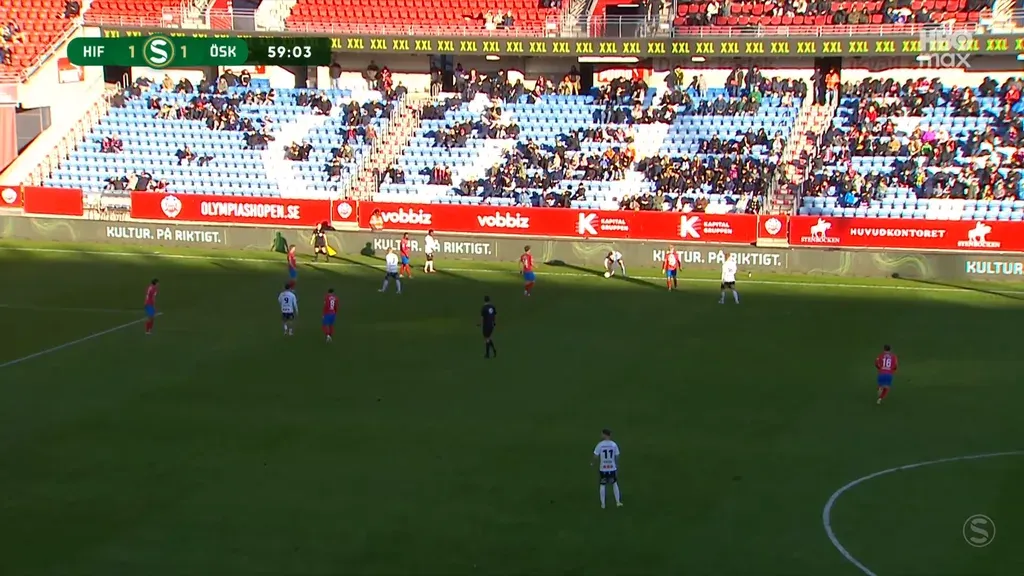
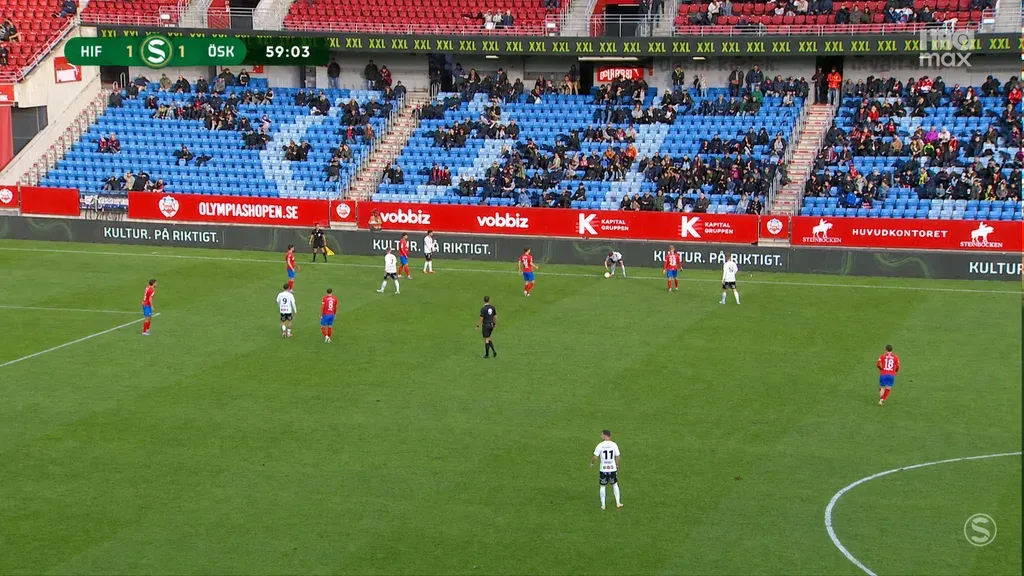
LivePictureAI automatically reduces harsh sunlight and deep shadows to balance lighting, in real time.
Pre-processing, answered
What does AI pre-processing before distribution mean?
Can it lower the bitrate we need for distribution?
Where in the chain does it go?
Does it change the look of our production?
Which formats does it accept, and how much latency does it add?
Does it work on recorded material as well as live feeds?
Can we test it on our own footage?
More on formats and placement on the broadcaster & OB page and in low-latency AI in the OB truck. For recorded matches, see archive football footage enhancement.
Interested in LivePictureAI?
Book a call or send us a message, whichever suits you.
Grab 30 minutes with the team and pick a time that suits you. You'll get instant confirmation and a Microsoft Teams link.
See available timesPick a day
Pick a time (Europe/Stockholm)
No open times in the next two weeks. Just and we'll find one.
You're booked in
We've emailed you a confirmation with the Microsoft Teams link. See you .
Prefer to write? instead.